Categories
Announcement Events News and Events

Tech Tools for Life Goes Hands-On in 2026!

By Arlene Lugo, Program Director, CT Tech Act Project

As the seasons shift, the echoes of our 2025 Tech Tools for Life Conference still reverberate with excitement. As we enter the peak of the holiday season, it’s never too late to share the triumphs of our 2025 event while unveiling exciting plans for 2026!

How good was it?
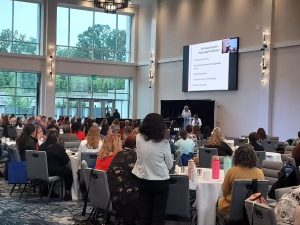
Kara and Alice Brouhard give Keynote Address on Day 2

Our two-day Assistive Technology conference, held on June 9th and 10th at the Bristol Event Center, was a great success with an overwhelmingly positive response! We had almost 250 attendees daily and a wide array of 30 exhibitor tables and 15 dynamic breakout sessions each day.
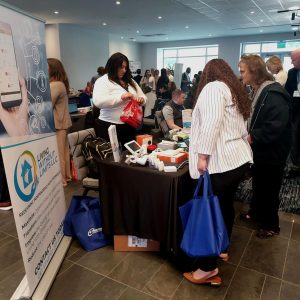
2025 Tech Tools for Life Conference Exhibit hall with attendees visiting the Living without Limits table.

Our keynote speakers, Lynne Seagle on Day 1 and Kara and Alice Brouhard on Day 2 delivered moving insights that left attendees inspired and invigorated.


The Survey Says…
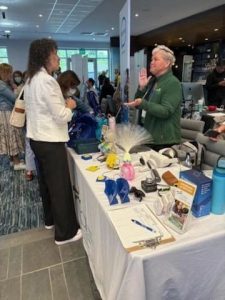
Visiting with UCP of Eastern CT’s exhibitor table.

Our Conference post-survey revealed a clear theme: attendees want more dedicated time for hands-on engagement with the AT devices and more interactive sessions.

About the Sessions:

“All sessions I attended were great! At times wish I could have been in 2 rooms at once.

Kudos for Keynotes:

“The keynote speaker was absolutely amazing!”

“Kara shared her story and a great real-life example of AT in practice.”

From an Exhibitor:

“My overall experience was top-notch.”

Favorite Sessions:

“I loved them all. Can’t possibly choose just one.”

You spoke – we listened!

As a result of the feedback we received, we have been working hard to establish the 2026 Tech Tools for Life, Assistive Tech at its Best: Hands-On Series.

Rather than a full two-day conference in 2026, we are planning a series of hands-on sessions across the state. You can tailor your AT learning experience by choosing sessions that interest you most and will give you the opportunity to engage directly with the latest in Assistive Technology. Dive into topics like Cooking with AT, DIY/Make & Take, Smart Home innovations, Accessible Gaming, Wearable Tech, Cutting-Edge Artificial Intelligence, and more. The Hands-on Series will begin in February 2026 and will run to the end of next year.

More information and details will be hitting your inbox soon. In the meantime, you can visit www.TechToolsforLife.org to find updates on the calendar for the Hands on Series for 2026, including location, registration links, payment information and more.
Tech Tools for Life Assistive Tech at its Best Hands On Series 2026 logo

For a Taste of What’s to Come

The Hands-On Series will kick off on February 12, 2026, from 10am – 2pm with our first session: Hands on… Aprons On: Cooking Without Limits presented by Living without LimitsThis session will accommodate up to 50 attendees who will be cooking with the use of Assistive Technology devices and will be able to enjoy the food as they make it. A modest registration fee of $25 per person will be charged. More info to come soon!

Nigel and James from Living without Limits are Cooking with AT.
Categories
News and Events Product Spotlight

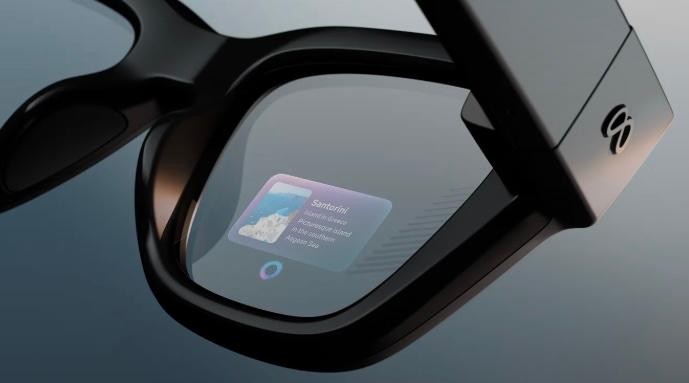
Tech Tool Spotlight: Meta Glasses – Live AI

Reprinted from the NEAT Newsletter, Dec. 2025 assistivetechnology.oakhillct.org

Here’s how it works:

To start a session, say “Hey, Meta, start Live AI.”

Once the session begins, you don’t need to say “Hey Meta” again during that session. To Pause, say “Pause Live AI” or tap the touchpad. To resume, say “Hey Meta, resume Live AI” of tap the touchpad again. To stop a session, say “Stop Live AI” or tap and hold the touchpad.

Blindness / Low Vision

  • A student with low vision entering a cafeteria can ask the glasses, “What does this menu say?” and hear the options.
  • While walking across campus, the glasses can alert the user to stairs, doors, or uneven surfaces.

Hearing

  • During a lecture, the glasses can display live captions so the user can follow along without a sign language interpreter.
  • The glasses can flash a light on the lens when a fire alarm goes off.

Mobility

  • In a large office or hospital, the glasses can guide the user to the exact room without relying on a phone or map.

Cognitive or Learning

A person with memory challenges cooking a meal can receive real-time instructions, such as “Next, chop the onions.”

Categories
Announcement News and Events Uncategorized

Register Now for CT’s AT Conference ! May 6 & 7, 2024

Tech Tools for Life Assistive Tech at its Best!

When: May 6th & 7th, 2024

Where: Omni Hotel, New Haven, CT.

Meet, network, learn & share with people advancing independent living through technology.

Register now at the Early Bird rate at this link: https://atechconference.org  and come back often to stay informed on:

  • Conference sessions
  • Speaker Announcements
  • Exhibitors, and
  • Sponsors

ATECH Conference 2024 is sponsored by the CT Tech Act Project & the Connecticut Council on Developmental Disabilities.

Categories
Announcement News and Events

ATIA 2024 – A Fantastic Learning Experience!

Written by Nicole Deary, AT Specialist, EASTCONN

My colleague and I recently attended the Assistive Technology Industry Association (ATIA) conference in Florida, and we are thrilled to share our experience. The event was a treasure trove of information, providing valuable insights into the latest advancements in technology designed to support individuals with communication disorders and other disabilities. The conference showcased a diverse range of products and solutions that left us impressed and excited about the possibilities in our field.

One of the highlights was attending the comprehensive sessions that delved into the practical applications of various assistive technologies. These sessions covered everything from augmentative and alternative communication (AAC) devices to innovative apps and software designed to enhance communication skills. The presenters were experts in their respective fields, offering in-depth knowledge and practical tips that we can now integrate into our practice.

The exhibit hall was a bustling hub of activity, with numerous vendors showcasing their latest products. It was a delight to explore the myriad of options available, each catering to different needs and preferences. From cutting-edge AAC devices with customizable features to user-friendly apps that promote language development, the diversity of assistive technology was truly impressive.

Engaging with the vendors provided us with a hands-on experience, allowing us to better understand each product’s functionality and potential benefits. Additionally, networking with professionals from various disciplines, as well as from our own home state of Connecticut, opened up opportunities for collaboration and knowledge exchange. The vendor exhibit was not only a feast for our mind but also for the taste buds, as attendees were treated to delicious hot pretzels and refreshing ice cream, creating a delightful atmosphere for networking and informal conversations.

Overall, the conference was a fantastic learning experience, and we left feeling invigorated and inspired by the vast potential of assistive technology. The event not only deepened our understanding of the available tools but also reinforced the importance of staying abreast of technological advancements to better serve individuals with communication disorders. We are eager to incorporate our newfound knowledge into our practice and contribute to the continued advancement of assistive technology in our field.

Categories
AT Reuse News and Events

Supply Chain Challenges, AT3 Center publication

AT Reutilization Programs have never been more important

State and Territory Assistive Technology Act Programs face a number of challenges, and two years into the pandemic, supply chain issues have rippled well beyond the ER and personal protective equipment to include non-COVID-related medical supplies. The AT3 Center Issue Brief highlights the work of Assistive Technology Reutilization Programs to bridge the gap. We hope you find this publication helpful and encourage you to share this Issue Brief with others.

Categories
Announcement News and Events

Emergency Broadband Benefit becomes a Permanent Program!

Great news for households who need broadband access in their homes! In the new Infrastructure Investment and Jobs Act, signed into law on Nov. 15, 2021, the Emergency Broadband Benefit became a permanent program – now called the Affordable Connectivity Program. Households who meet the 200% of poverty level may receive a $30.00 per month subsidy towards the cost of their broadband.

For full details, the following link provides a great explanation: How the Infrastructure Investment and Jobs Act will Make Broadband More Affordable | Benton Institute for Broadband & Society

And the following will take you the FCC’s page that explains eligibility and the two step process to enroll into the program: Emergency Broadband Benefit | Federal Communications Commission (fcc.gov).

Please encourage anyone you know who may benefit from this program to apply.

Categories
News and Events Resource

How Assistive Technology Can Support Those Experiencing “Long COVID”

Reposted from IL_NET TA, National Technical Assistance Center for Independent Living

What Are “Post-COVID Conditions (Long COVID)?”

According to the CDC, post-COVID conditions are “a wide range of new, returning, or ongoing health problems people can experience four or more weeks after first being infected with the virus that causes COVID-19.” Often referred to as “long COVID,” the scientific name is “Post-Acute Sequelae of SARS-CoV-2 infection (PASC),” and may also be referenced as “long-haul COVID,” “post-acute COVID,” “long-term effects of COVID,” and “chronic COVID.” People who experience long COVID may have had severe, mild, or asymptomatic COVID-19 in the days or weeks after their initial infection with the virus. New research (not yet peer-reviewed) suggests persons with breakthrough infections who were fully vaccinated and under age 60 may be protected from long COVID, but those over age 60 are not. Long COVID presents as different health problems and combinations of symptoms within a wide range of severity. Common symptoms are extreme fatigue, shortness of breath, problems with cognition, and a racing heartbeat. Neurological symptoms appear to be the most enduring; many long COVID patients report problems with memory and “brain fog.” Children, as well as adults, may experience long COVID. Some studies suggest more women than men may acquire long COVID. (Read some experiences of people living with long COVID.)

In February of 2021, the NIH announced a new initiative to study long COVID. Among the questions the initiative seeks to answer is, “Does SARS-CoV-2 infection trigger changes in the body that increase the risk of other conditions, such as chronic heart or brain disorders?” As of July 2021, long COVID can be considered a disability under the Americans with Disabilities Act (ADA), Section 504, and Section 1557 if the condition substantially limits one or more major life activities.

The Unique Role of AT Act Programs Persons with long COVID may be experiencing disability for the first time in their lives. The national field of State and Territory Assistive Technology (AT) Act Programs has spent decades committed to serving individuals of all ages with all kinds of disabilities (and combinations of disabilities) wherever they live, learn, work, and play. AT Act Programs uniquely understand and respond to the needs of adults and children that arise from temporary and long-term disabilities. AT Act Programs provide a stigma-free environment for persons with disabilities (and those who serve or love them) to learn about, try out, and acquire the assistive technologies that maintain or improve independence. As we learn more about how to treat long COVID, those experiencing long-term effects from COVID-19 can benefit from the AT services millions of people have sought for staying in or getting back into their lives.

For example, AT Act Programs provide access to:

AT for Fatigue and Mobility:
• equipment for bathroom safety
• transport wheelchairs and rollators for reduced stamina and stability
• gadgets for completing daily living tasks with reduced dexterity (from joint and muscle pain) AT for Memory and Cognition:
• an understanding of built-in features of iOS and Android operating systems and apps common to smartphones
• loans of tablet computers with apps for accomplishing tasks and goals identified by the borrower
• smart pens for keeping up with meetings (or productivity apps that sync to audio recordings)
• low-tech solutions and strategies for remembering medications and other essentials
• smart speakers and how to use them to support cognition AT for Social Isolation and Telehealth:
• loans of tablet computers and laptops for video conferencing, social media, email, and recreation
• Echo Show and similar technologies
• simplified connected devices for memory impairment
• alternative computer access
• assistive listening devices

AT for Work:
• alternative workstations and workstation adaptations
• strategies and technologies for improving stamina at work
• information and referral for rehabilitation services and a deep knowledge of cross-disability services as a point of entry for those newly disabled

AT Act Programs provide free demonstrations of assistive technologies in an environment that is without pressure to choose any particular product. The programs additionally provide free or low-cost short-term loans of devices to fill a temporary need or to trial before deciding to purchase, as well as counseling on funding options. AT Act Programs are staffed by professionals who may be AT users themselves and who can link visitors to additional services as necessary or help problem-solve the needs of others in their lives (clients, family members, students). AT Act Programs are the only service network that provides this kind of solutions-driven, cross-disability, multi-age, assistive technology support for maintaining the independence of persons living with long COVID in the pandemic and post-pandemic world.

Find Your State or Territory AT Act Program


Categories
ICT Accessibility News and Events

Digital Accessibility Tip! Hashtags, Email Addresses and Usernames

Written by Adam Kosakowski, M.Ed., ATP

A hashtag is a metadata tool used to easily compile and cross reference digital content on the web. Hashtags also make it possible for posters to share a love of cats on social media with bigger audiences. Email addresses and usernames are, well, mostly used to receive junk mail and messages from people in high school you don’t want to reconnect with. Still, what do they all have in common, and what does that have to do with digital accessibility?

They all use words with no spaces between them! Today’s tip will focus on how you can type hashtags, email addresses, and usernames in the most accessible way possible.

Hashtags: Print Disabilities and Screen Reader Users

Whether you have useable vision or use a screen reader, try reading the following hashtag:

#catsarethebestanimalsever

It isn’t easy! Where does one word end and the other begin? Does it say, “Cats are the best animal sever” or “Cats are the best animals ever?” Depending on the person reading or the screen reader and its settings, either way is possible. When I tested it with NVDA (a popular free screen reader) it said, “animal sever”; if I am trying to post a cat picture, why would I try to convey that message? It’s nonsense!

To help everyone more easily read this, try using camel case. Camel case is the practice of writing with no punctuation or spaces, but using capital letters for the first letter in each word within. With camel case, the hashtag above becomes:

#CatsAreTheBestAnimalsEver

I bet most people would agree, even those without print disabilities, that this is much easier to read. Also, it ensures the hashtag says “animals ever” and not “animal sever.” The same goes for screen readers; this helps screen readers correctly identify the intended words.

Email Addresses and Usernames

The above case is becoming slightly more well known in the circles that focus on accessibility, but what about email addresses and usernames? I have noticed next to no one use camel case with these and yet it is just as important!

For example, my email address is obnoxiously long. I have a ten-letter last name and the text after the “at” symbol is “Oak Hill CT.” Without camel case it looks like this:

adam.kosakowski@oakhillct.org

Unless someone is familiar with Oak Hill or is employed in the same organization, the address is confusing when all lowercase. And when read with NVDA it says, “Adam dot Kosakowski @ Oak Hill dot org.” NVDA says something after “Oak Hill”, but it is not discernible. It sounds like it straight up skips the “CT”! This could make the difference between people knowing my email address and not. And while I’d like less spam, I want to help people with accessibility!

The solution is simple: use camel case. And when it comes to acronyms, make all the letters capital.

Here is my email without camel case vs with:

Adam.kosakowski@oakhillct.org vs Adam.Kosakowski@OakHillCT.org

And here is my Twitter handle without camel case vs with:

@neatwithadam vs @NEATWithAdam

The capital “W” after the all-caps NEAT acronym may look weird, but this follows the two rules that ensure screen readers will read it perfectly:

  1. Capitalize the first letter of each word.
  2. Capitalize each letter in an acronym.

I hope you find this helpful!

This column is written by Adam Kosakowski, M.Ed., ATP

Adam works as an Assistive Technology Specialist at New England Assistive Technology (NEAT), an Oak Hill Center.

He can be contacted at Adam.Kosakowski@OakHillCT.org and followed on twitter at @NEATWithAdam

Categories
AT Success Stories News and Events

Interview between Ann Bedard, M.S., CCC-SLP and Kevin Williams, Prentke AAC Distinguished Lecture at ATIA 2021

How were you chosen to give the Edwin and Esther Prentke Augmentative and Alternative Communication (AAC) Distinguished Lecture at ATIA?

Kevin WilliamsI was nominated by Celeste Helling, a Charlotte based SLP who works at the North Carolina Assistive Technology Program (NCATP). Celeste submitted a written nomination to the review committee for the lecture. The review committee chose me from the pool of nominees they had this year. It wasn’t much to do on my end as Celeste knows most of my history, because she has helped me get my AAC devices since I moved to North Carolina from Ohio. There was just a quick e-mail exchange asking for my consent to be nominated, my topic for the lecture, and a 5-minute video of me speaking in order to demonstrate I could answer questions spontaneously after I completed my talk.

What could other PWUAAC (People who use AAC) learn from your journey?

I hope that people learn that each person’s journey to communicate is unique to them, and the journey is hard work for everyone. Yes, I have a love and talent for using technology, but I also put in the time to learn my communication system outside therapy sessions and time with my family. Being raised by a single mother putting herself through school, I saw and learned to always appreciate the help but strive for independence with a strong determination. A person will know what I am trying to communicate by any means necessary.

I’m always trying to figure out how to increase consistency for the AAC user and it’s often hard to figure out where the breakdown is. How did it work out so well in your case?

I know SLPs love having everyone “buy-in” to AAC, but I think you are looking at it from the wrong direction. The only person that needs to “buy-in” into the AAC strategies is the augmented communicator. Parents, teachers, and friends that the Augmented Communicator encounters rarely care or really grasp the nuts and bolts about the new strategies learned in therapy. They just want to reap the results of the application of the strategy in communication. The “buy-in” for them is having the patience to listen, keep the system running, and keep the system available to the communicator at all times. Any other things are done in therapy.

To use a sports analogy comparing it to basketball: in a training session, a player and trainer work on playing skills like footwork and form on their jump shot. The player and trainer can get excited over the strategies to improve skills on the court. Other players, who are peers on the court, may notice and have interest in the drills the player does to improve skills on the court. But coaches and family members may concentrate on the results of applying those skills to make plays and score. They may not know or care about the drills. Yet if the player “buys into” the drills, they will then be successful.

My mom didn’t know any Bliss (symbols set) when I was little, nor did any of my family or friends. They just read the labels. Yet my SLP worked on an advanced Bliss while I was in therapy sessions. My friends and family don’t know Minspesk, and still they support me 100% just by talking to me. I still finger spell and use my natural voice to communicate with close family and friends. Yet I can easily use my device when in public.

Look at how the person augments their communication strategies in therapy, in class, or at home. Can the person employ a strategy to say something more effectively?

How did you come up with the term “augmented communicator” and why is it better than the alternatives?

I came up with the term Augmented Communicator myself. I believe through hard work and a level of mastery in the methods we use to communicate, it actually changes (“augments”) how we communicate or at least how we approach communicating. Optimizing our approach to fit our methods, makes people better communicators.

Looking at the use of the phrase as a tool for advocacy, all of my assistive technology, wheelchair and AAC Devices are just extensions of my identity as a disabled person. The phrase Augmented Communicator is used in the spirit of the identity-first language model in order for the communication disability to be seen as a limitation put on by surrounding society rather than something to overcome with the aid of technology.

The goal is not to be seen separate from my Assistive Technology. The goal is to see my assistive technology as just how I speak, walk, cook or whatever I use it for to accomplish success in my daily life. My assistive technology is an essential part of me and how I interact with the world. It goes everywhere I do, and it can’t be turned off or put away (e.g. in a bag, or on a shelf) at any time I need to interact. The label, Augmented Communicator, captures all of that in two words and allows people to take ownership of their communication. Anybody can be a person who uses AAC, but not everyone can be an Augmented Communicator without putting in the work, or that’s at least how I feel.

Like any label, Augmented Communicator is no better or worse than any other label. They are a personal choice of how we perceive ourselves and how we organize things to make sense from a particular perspective. Not everyone will agree with my perspective, but having the ability to put it into words for people to disagree with is something to savor.

Categories
ICT Accessibility News and Events

Accessibility Tip: Everyone Uses Captions!

Written by Adam Kosakowski, M.Ed., ATP, Assistive Technology Specialist at New England Assistive Technology (NEAT), an Oak Hill Center

If you’re deaf or hard of hearing or know someone in that population, you likely know about captioning and how it’s needed on videos in order for them to be accessible. But, did you also know that 80% of people who use captions are not deaf or hard of hearing? I am part of that 80%, and although I do not identify with deafness or being hard of hearing, I always turn on
subtitles/captioning when available because it improves my comprehension of dialogue and increases my engagement with the video.

I love captions!
What I’m saying is, captions are used by a huge audience!
(For this statistic and more, check out this link: captioning statistics article by 3PlayMedia)

Quick fact! Captioning and subtitles are technically different. Subtitles are displayed during a video that includes spoken dialogue. Compare this to captioning, which includes spoken dialogue as well as non-dialogue noises like laughter, coffee pouring, explosions, etc. But, the two terms are often used interchangeably nowadays. This article will use the term captioning in
this flexible way.

So, nearly everyone wants captioning, whether or not they have a disability. But, captioning on videos in social media is rare, especially when you consider how many videos are posted every day. The good news is that you don’t need to be a video editing expert to add captions to your videos. There are a myriad of ways to add captions to your videos and my favorite is Clipomatic on Apple devices.

Clipomatic costs $4.99, but it is so worth it. When you start up the app, you press the big red record button and start recording, just like you would in other recording apps. While you record, the app automatically hears what you’re saying and adds captions to your video. When you’re done, press the stop button. Before you save your video, you can even tap a caption it created and then edit it, which is great when the app makes a rare mistake in its word recognition.

Using apps like this, you can seamlessly add captioning to your videos and post to social media. Taking this small, extra step can help you make a statement as an accessibility advocate!

Contact Adam at Adam.Kosakowski@OakHillCT.org and follow him on Twitter: @NEATwithAdam