Categories
Announcement Events News and Events

Tech Tools for Life Goes Hands-On in 2026!

By Arlene Lugo, Program Director, CT Tech Act Project

As the seasons shift, the echoes of our 2025 Tech Tools for Life Conference still reverberate with excitement. As we enter the peak of the holiday season, it’s never too late to share the triumphs of our 2025 event while unveiling exciting plans for 2026!

How good was it?
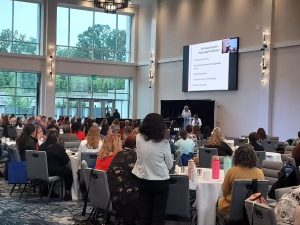
Kara and Alice Brouhard give Keynote Address on Day 2

Our two-day Assistive Technology conference, held on June 9th and 10th at the Bristol Event Center, was a great success with an overwhelmingly positive response! We had almost 250 attendees daily and a wide array of 30 exhibitor tables and 15 dynamic breakout sessions each day.
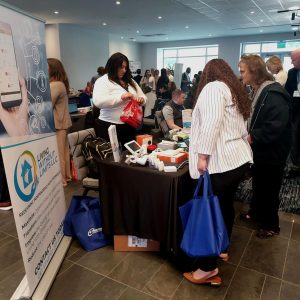
2025 Tech Tools for Life Conference Exhibit hall with attendees visiting the Living without Limits table.

Our keynote speakers, Lynne Seagle on Day 1 and Kara and Alice Brouhard on Day 2 delivered moving insights that left attendees inspired and invigorated.


The Survey Says…
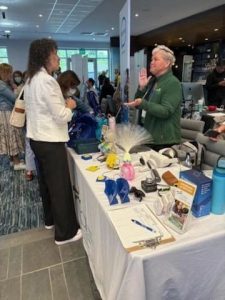
Visiting with UCP of Eastern CT’s exhibitor table.

Our Conference post-survey revealed a clear theme: attendees want more dedicated time for hands-on engagement with the AT devices and more interactive sessions.

About the Sessions:

“All sessions I attended were great! At times wish I could have been in 2 rooms at once.

Kudos for Keynotes:

“The keynote speaker was absolutely amazing!”

“Kara shared her story and a great real-life example of AT in practice.”

From an Exhibitor:

“My overall experience was top-notch.”

Favorite Sessions:

“I loved them all. Can’t possibly choose just one.”

You spoke – we listened!

As a result of the feedback we received, we have been working hard to establish the 2026 Tech Tools for Life, Assistive Tech at its Best: Hands-On Series.

Rather than a full two-day conference in 2026, we are planning a series of hands-on sessions across the state. You can tailor your AT learning experience by choosing sessions that interest you most and will give you the opportunity to engage directly with the latest in Assistive Technology. Dive into topics like Cooking with AT, DIY/Make & Take, Smart Home innovations, Accessible Gaming, Wearable Tech, Cutting-Edge Artificial Intelligence, and more. The Hands-on Series will begin in February 2026 and will run to the end of next year.

More information and details will be hitting your inbox soon. In the meantime, you can visit www.TechToolsforLife.org to find updates on the calendar for the Hands on Series for 2026, including location, registration links, payment information and more.
Tech Tools for Life Assistive Tech at its Best Hands On Series 2026 logo

For a Taste of What’s to Come

The Hands-On Series will kick off on February 12, 2026, from 10am – 2pm with our first session: Hands on… Aprons On: Cooking Without Limits presented by Living without LimitsThis session will accommodate up to 50 attendees who will be cooking with the use of Assistive Technology devices and will be able to enjoy the food as they make it. A modest registration fee of $25 per person will be charged. More info to come soon!


Nigel and James from Living without Limits are Cooking with AT.
Categories
News and Events Product Spotlight

Tech Tool Spotlight: Meta Glasses – Live AI

Reprinted from the NEAT Newsletter, Dec. 2025 assistivetechnology.oakhillct.org

Here’s how it works:

To start a session, say “Hey, Meta, start Live AI.”

Once the session begins, you don’t need to say “Hey Meta” again during that session. To Pause, say “Pause Live AI” or tap the touchpad. To resume, say “Hey Meta, resume Live AI” of tap the touchpad again. To stop a session, say “Stop Live AI” or tap and hold the touchpad.

Blindness / Low Vision

  • A student with low vision entering a cafeteria can ask the glasses, “What does this menu say?” and hear the options.
  • While walking across campus, the glasses can alert the user to stairs, doors, or uneven surfaces.

Hearing

  • During a lecture, the glasses can display live captions so the user can follow along without a sign language interpreter.
  • The glasses can flash a light on the lens when a fire alarm goes off.

Mobility

  • In a large office or hospital, the glasses can guide the user to the exact room without relying on a phone or map.

Cognitive or Learning

A person with memory challenges cooking a meal can receive real-time instructions, such as “Next, chop the onions.”

Categories
Announcement News and Events Uncategorized

Register Now for CT’s AT Conference ! May 6 & 7, 2024

Tech Tools for Life Assistive Tech at its Best!

When: May 6th & 7th, 2024

Where: Omni Hotel, New Haven, CT.

Meet, network, learn & share with people advancing independent living through technology.

Register now at the Early Bird rate at this link: https://atechconference.org  and come back often to stay informed on:

  • Conference sessions
  • Speaker Announcements
  • Exhibitors, and
  • Sponsors

ATECH Conference 2024 is sponsored by the CT Tech Act Project & the Connecticut Council on Developmental Disabilities.

Categories
Announcement News and Events

ATIA 2024 – A Fantastic Learning Experience!

Written by Nicole Deary, AT Specialist, EASTCONN

My colleague and I recently attended the Assistive Technology Industry Association (ATIA) conference in Florida, and we are thrilled to share our experience. The event was a treasure trove of information, providing valuable insights into the latest advancements in technology designed to support individuals with communication disorders and other disabilities. The conference showcased a diverse range of products and solutions that left us impressed and excited about the possibilities in our field.

One of the highlights was attending the comprehensive sessions that delved into the practical applications of various assistive technologies. These sessions covered everything from augmentative and alternative communication (AAC) devices to innovative apps and software designed to enhance communication skills. The presenters were experts in their respective fields, offering in-depth knowledge and practical tips that we can now integrate into our practice.

The exhibit hall was a bustling hub of activity, with numerous vendors showcasing their latest products. It was a delight to explore the myriad of options available, each catering to different needs and preferences. From cutting-edge AAC devices with customizable features to user-friendly apps that promote language development, the diversity of assistive technology was truly impressive.

Engaging with the vendors provided us with a hands-on experience, allowing us to better understand each product’s functionality and potential benefits. Additionally, networking with professionals from various disciplines, as well as from our own home state of Connecticut, opened up opportunities for collaboration and knowledge exchange. The vendor exhibit was not only a feast for our mind but also for the taste buds, as attendees were treated to delicious hot pretzels and refreshing ice cream, creating a delightful atmosphere for networking and informal conversations.

Overall, the conference was a fantastic learning experience, and we left feeling invigorated and inspired by the vast potential of assistive technology. The event not only deepened our understanding of the available tools but also reinforced the importance of staying abreast of technological advancements to better serve individuals with communication disorders. We are eager to incorporate our newfound knowledge into our practice and contribute to the continued advancement of assistive technology in our field.

Categories
AT Reuse News and Events

CT Schools Can Transfer Assistive Technology Devices to Graduating Students

Written by Gretchen Knauff, Director, Office of Services for Persons with Disabilities, City of New Haven

When children and young adults with disabilities leave a school system there is often a gap in services, especially when they transition from school to the adult service system or higher education opportunities. This gap is really evident for students who receive and use Assistive Technology (AT) devices as tools to assist them in their school programs. Generally, AT devices are returned to the school and the student must wait for a device from the adult service system. This can take months, leaving the student without the AT needed to accommodate their disability.

Did you know that this doesn’t have to happen?

Connecticut General Statute §10-76y, Assistive Devices, addresses this issue by allowing school districts, regional educational service centers, the Department of Education, and all other state and local governmental agencies concerned with education to loan, lease, or transfer an assistive device to the student, the student’s family or to a profit or nonprofit entity that serves people with disabilities.

What if the school purchased the device less than a year ago?

It’s okay. The school can loan, lease, or transfer the assistive device at any time. It does not have to be a surplus item. If the device is sold or leased, the cost would be determined by the depreciated value of the device. The school district may also transfer the device without a cost to student or family. Any sale, lease or transfer is recorded in a written agreement between the school district and the student, family or organization receiving the device.

Is there a benefit for the school district?

Yes, there are multiple benefits. School districts were reluctant to sell the devices because the money would go back to the municipality and not the school district. CGS §10-76y(b) directs the funds from the sale or lease of an assistive device to remain with the local or regional board of education serving the student. The money can be used to buy updated equipment rather than having an obsolete piece of equipment sit in a closet collecting dust. Everybody wins, especially the student with the disability!

Categories
AT Success Stories News and Events

A Booklover’s Story of Finding Her Voice

Co-authored by Ann Bedard, EASTCONN and Meredith Daggett

Sydney Daggett’s early life started in Texas alongside her twin sister, Maddie. Early on, her family noticed Syd was globally delayed. All of the typical milestones that babies and toddlers experience came much later for Sydney.

Sydney in her Book Nook

Years of Birth-to-Three services, Occupational Therapy, Physical Therapy and Speech Therapy helped, but her family knew this would be a lifelong adventure. Syd’s mother, Meredith, knew she wanted to research every area to help Syd grow. She knew technology was improving and asked Syd’s school if she could try using an iPad to communicate. Syd used it minimally at first, but it proved to be a way to get her basic needs met.

After Syd’s father passed away unexpectedly when Syd was 7 years old, the family moved back to Connecticut. School staff and doctors diagnosed Syd as being on the Autism Spectrum among other diagnoses. They found out Syd has apraxia, which is a motor disorder that makes it hard to speak. This is the point where Syd’s mom knew they had to invest time and consistency in her talker (iPad with a speech-generating app). Fast forward to age 17 and Syd wears her talker as an extension of herself every day. It has become her communication with her world.

“She gets all her needs met, often asking for pizza and Chinese food daily! Drives us crazy and she’s lucky she’s cute! She can tell jokes and join conversations because of her talker,” Syd’s mom, Meredith shares. “We realize Syd is one of the lucky ones who had the opportunity to use a talker, have lots of school support and have the training that comes along with a talker. This didn’t just happen though, it took years of advocating for Syd, patience, and getting all the support she needs.”

Now her family’s mission is to give back. Syd’s Book Shack & Boutique is a non-profit business created from their experience. Currently located in Guilford, CT, (and soon to be moving to a larger location in Madison, CT) the store is open 6 days a week selling used and rare books, handcrafted jewelry, and unique gifts. They want to raise awareness and funds towards supplying talkers to those who do not have access.

“We want to use this nonprofit as a way to acquire talkers for those who do not have the resources Syd has,” her mom explains. “Our plan is considering other avenues to help and benefit our community kids too. We wish to be able to give young adults like Syd job training and social skills using the store as the vehicle. All of us want this to be a community hang out where all are welcome and greeted with a smile. We have met so many amazing people along the way and look forward to meeting so many more.” To reach out, please visit: www.Sydsbookshack.com, @sydsbookshack, facebook.com/SydsBookShack

Categories
AT Success Stories News and Events

AT Tools Benefit Student with Complex Learning Needs

by Stacey Fulton, EASTCONN

A student diagnosed with Dyslexia, poor phonological awareness, impacted by ADHD and speech apraxia was referred to EASTCONN for an AT evaluation, specifically focused on written expression. (The student was using some tools for accessing text and more recommendations were added for reading as a result of the evaluation.) Her handwriting was legible, but due to her very poor phonological awareness, it was difficult to decipher what she was trying to say. Prior to requesting an AT evaluation, the student was utilizing Read & Write’s word prediction feature on a Chromebook, but she was taking excessive amounts of time to complete writing tasks, resulting in frustration and eventually shutting down.

One issue was that the student had significant difficulties and took excessive amounts of time just logging into her Chromebook (even when provided with a visual of information for her account). Once logged in, she had difficulties finding the keys on the keyboard quickly. The student was bright, creative and had great ideas, but even the simplest words required a lot of effort and energy for her to spell despite the assistance of Word Prediction.

When using the word prediction, she was usually able to come up with the first letter of a word. Each time she typed a letter, she used the text-to-speech features to listen to the long list of words predicted. This required extensive time and energy and the student often became so frustrated, she was allowed to dictate her sentences while the staff scribed for her. Speech-to-text was also trialed by the district using Voice Typing (Google Docs), but because of her poor articulation, there were a significant number of errors (at the one-word level and sentence level).   It was felt that AT programs that provided the words (like Clicker Writer) would limit her ideas and creativity.

EASTCONN’s evaluator trialed Co:Writer Universal using topic dictionaries. Use of the topic dictionaries significantly helped this student as the words she wanted to use came up quickly (after 1 or 2 letters) and she was able to select the correct word by listening (out of a choice of 5). In addition, this evaluator trialed Co:Writer on the iPad and found that the student was quicker and more efficient with finding the letters on the on-screen keyboard and accessing the predicted words above the keyboard.

With everything in the same visual plane and no login, she became much more efficient. With the help of these tools, the student can be more independent and successful with some writing tasks, lessening the frustration and increasing the confidence in herself.

After a period of time using the recommended tools, the teacher reported: “EASTCONN found tools to unlock so many reading and writing tasks. They loaned us an iPad from their lending library (which proved to be a gamechanger, versus third grade’s traditional use of a Chromebook). After practicing in the resource room, she has now generalized her use of the AT into the general education classroom.”

Categories
AT Reuse News and Events

Supply Chain Challenges, AT3 Center publication

AT Reutilization Programs have never been more important

State and Territory Assistive Technology Act Programs face a number of challenges, and two years into the pandemic, supply chain issues have rippled well beyond the ER and personal protective equipment to include non-COVID-related medical supplies. The AT3 Center Issue Brief highlights the work of Assistive Technology Reutilization Programs to bridge the gap. We hope you find this publication helpful and encourage you to share this Issue Brief with others.

Categories
Announcement News and Events

Emergency Broadband Benefit becomes a Permanent Program!

Great news for households who need broadband access in their homes! In the new Infrastructure Investment and Jobs Act, signed into law on Nov. 15, 2021, the Emergency Broadband Benefit became a permanent program – now called the Affordable Connectivity Program. Households who meet the 200% of poverty level may receive a $30.00 per month subsidy towards the cost of their broadband.

For full details, the following link provides a great explanation: How the Infrastructure Investment and Jobs Act will Make Broadband More Affordable | Benton Institute for Broadband & Society

And the following will take you the FCC’s page that explains eligibility and the two step process to enroll into the program: Emergency Broadband Benefit | Federal Communications Commission (fcc.gov).

Please encourage anyone you know who may benefit from this program to apply.

Categories
General News and Events

Using AT for Everyday Tasks

Written by Stacey B. Fulton, OTR/L, ATP, CAPS & Carlie Clayton, OTR/L

EASTCONN’s Assistive Technology Department teamed up with EASTCONN’s EXCELS program for an all-inclusive Thanksgiving activity! Our team included students, related services (OT/Speech) and a paraprofessional working together with assistive technology to make it possible to create a yummy Thanksgiving treat. In order to make pumpkin pie in a cup, two students were given a guided recipe book on an iPad with auditory and visual support to increase independence. Another student utilized a switch to activate a blender to crush graham crackers to make the “crust.” These tools enabled the students to make a delicious treat for themselves and their classmates with greater independence. The use of assistive technology can make for a more inclusive holiday and provide increased independence for people of all abilities!

https://www.facebook.com/wherelearningcomestolife/videos/1011585019698137/

Students working on individual recipes using their Assistive Technology   Student follows the recipe sequence one page at a time by listening to the directions read and following the visual steps.  Student uses a switch and Powerlink to turn the blender on to crush the Graham crackers.