Categories
AT Success Stories News and Events Product Spotlight

How AI Glasses Gave a CT Photographer His Independence Back


Reprinted from WHSU Public Radio By Jeniece Roman, WSHU, Photos: Jeniece Roman / WSHU

After a long career as a photographer, a Connecticut man had to come to terms with the gradual loss of his eyesight. However, with the help of new technology, he’s reconnecting with the world.

Jack McConnell has been a commercial photographer for over 50 years. McConnell was diagnosed with diabetic retinopathy, an eye disease caused by diabetes that brings gradual vision loss. Now he’s completely blind in one eye and can only see dark shapes and light in the other.

“A year ago, I could see the trees across the way, with their incredible branches and leaves and green dancing to the breeze of a springtime day. Not anymore. It’s black. It’s dark gray. There’s nothing there,” McConnell said.

Before his condition, McConnell traveled the world to meet interesting people and embedded himself in different communities. From traveling on a container ship in the North Sea to taking photographs of locals on an island off the coast of Maine, McConnell has taken roughly 250,000 images throughout his career. He said the shift has been a difficult change in his life.

“When something happens, you either fight it or you deal with it. And I’ve had to learn to deal with it,” McConnell said.

Then, a friend of McConnell recommended he visit UCP of Eastern Connecticut, a nonprofit center that provides programs for people with disabilities. Patients are then matched with programs and services based on various factors. The center has a lending library where people can rent assistive technology to try before purchasing.

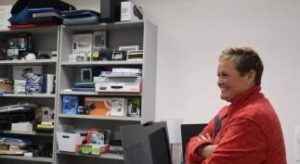
Shannon from UCP of Eastern Connecticut stands in front of the device lending library with a smile.
Shannon Taber with the UCP of Eastern Connecticut.
Shannon Taber is the director of Inclusion and Accessibility. Taber trained McConnell on how to use Meta AI glasses, a new technology from Ray-Ban and Meta, makers of Facebook. The glasses combine voice commands with artificial intelligence. Although they look like a normal pair of sunglasses, the Meta glasses have cameras that can take photos, scan the area in front of them, and even speak to them through built-in speakers near the ears. The glasses can identify items like food menus, money and medication labels.

“Jack said, ‘I really like these. Can I keep these for a while?’ And so we did a four-week loan with the Meta glasses. Jack liked them. Found some significant independence with those,” Taber said.

McConnell previously tried ORCam technology, but he preferred the Meta glasses. Compared to the nearly $4,000 price tag, the $400 Meta frames were more affordable. Funding is a huge hurdle for the center. Taber said the center does a lot of grant writing and is always looking for new partnerships. The center purchased the glasses through special funding from the Connecticut Tech Act.

“This is a population that is always underserved and always underfunded. They usually live on a very limited, very tight income, very constrained, and we get requests on a daily basis for assistance,” Taber said. “I would say the greater majority of the time, assistive technology is not within their budget. So for us, we have to find ways. To fund it for them.”

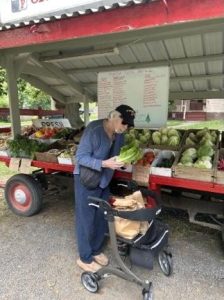
Jack at the farmers market using his Meta glasses.
Jack is at the farmers market using his Meta glasses.

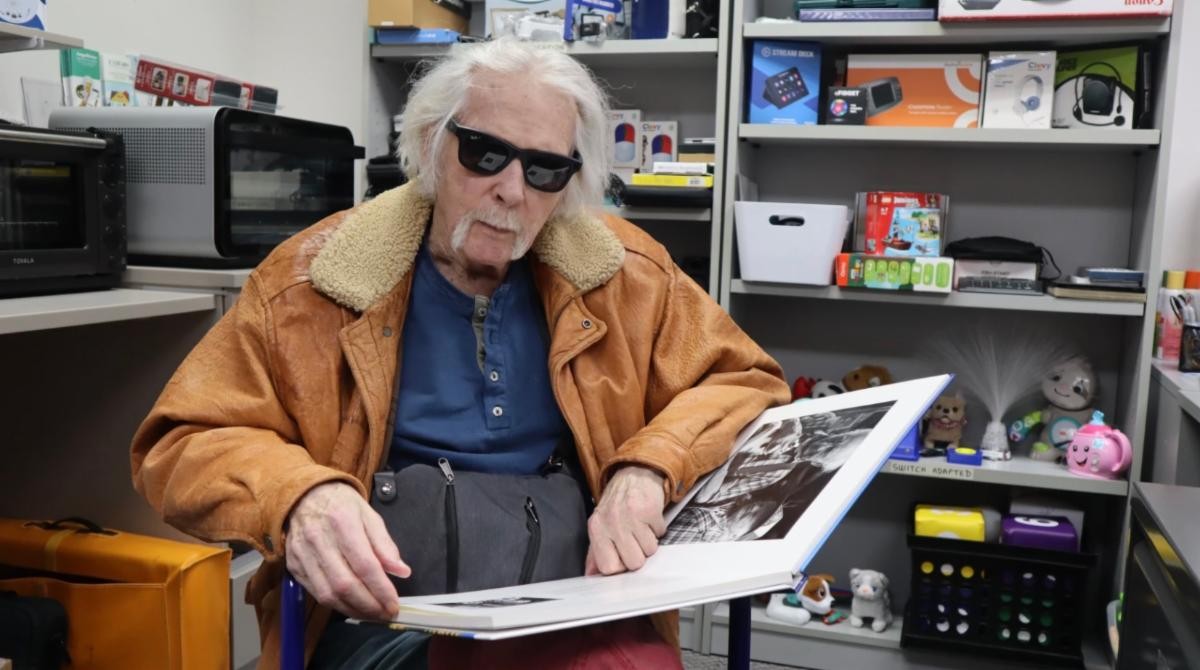
On a visit to the center, McConnell met with Taber to test out a few more features. With the command “Hey, Meta,” McConnell can ask the glasses to take a photo or describe what’s in front of him. McConnell sat down with a book of his photography. He asked the glasses to describe the picture in front of him. From the description, McConnell recognizes the subject of the photo and begins to tell a story about the encounter. Now, he can ‘see’ his photography with the help of the glasses.

McConnell said the glasses have allowed him to get back to daily life, from reading a menu at restaurants to grocery shopping and meeting up for coffee with friends. He said the glasses have significantly opened up his environment and that he looks forward to using them more.

“I now have the glasses, and they do help me see where I am when I go out. I’m really looking forward to going out a lot more and getting out of the house, getting into the world and dealing with it with the help of Meta,” McConnell said. “I know that’s going to make a big difference for me.”

McConnell said with his renewed confidence, he’s less isolated and feels like he’s part of the world again. He may even start taking photos again.


Categories
AT Success Stories News and Events

A Booklover’s Story of Finding Her Voice

Co-authored by Ann Bedard, EASTCONN and Meredith Daggett

Sydney Daggett’s early life started in Texas alongside her twin sister, Maddie. Early on, her family noticed Syd was globally delayed. All of the typical milestones that babies and toddlers experience came much later for Sydney.

Sydney in her Book Nook

Years of Birth-to-Three services, Occupational Therapy, Physical Therapy and Speech Therapy helped, but her family knew this would be a lifelong adventure. Syd’s mother, Meredith, knew she wanted to research every area to help Syd grow. She knew technology was improving and asked Syd’s school if she could try using an iPad to communicate. Syd used it minimally at first, but it proved to be a way to get her basic needs met.

After Syd’s father passed away unexpectedly when Syd was 7 years old, the family moved back to Connecticut. School staff and doctors diagnosed Syd as being on the Autism Spectrum among other diagnoses. They found out Syd has apraxia, which is a motor disorder that makes it hard to speak. This is the point where Syd’s mom knew they had to invest time and consistency in her talker (iPad with a speech-generating app). Fast forward to age 17 and Syd wears her talker as an extension of herself every day. It has become her communication with her world.

“She gets all her needs met, often asking for pizza and Chinese food daily! Drives us crazy and she’s lucky she’s cute! She can tell jokes and join conversations because of her talker,” Syd’s mom, Meredith shares. “We realize Syd is one of the lucky ones who had the opportunity to use a talker, have lots of school support and have the training that comes along with a talker. This didn’t just happen though, it took years of advocating for Syd, patience, and getting all the support she needs.”

Now her family’s mission is to give back. Syd’s Book Shack & Boutique is a non-profit business created from their experience. Currently located in Guilford, CT, (and soon to be moving to a larger location in Madison, CT) the store is open 6 days a week selling used and rare books, handcrafted jewelry, and unique gifts. They want to raise awareness and funds towards supplying talkers to those who do not have access.

“We want to use this nonprofit as a way to acquire talkers for those who do not have the resources Syd has,” her mom explains. “Our plan is considering other avenues to help and benefit our community kids too. We wish to be able to give young adults like Syd job training and social skills using the store as the vehicle. All of us want this to be a community hang out where all are welcome and greeted with a smile. We have met so many amazing people along the way and look forward to meeting so many more.” To reach out, please visit: www.Sydsbookshack.com, @sydsbookshack, facebook.com/SydsBookShack

Categories
AT Success Stories News and Events

AT Tools Benefit Student with Complex Learning Needs

by Stacey Fulton, EASTCONN

A student diagnosed with Dyslexia, poor phonological awareness, impacted by ADHD and speech apraxia was referred to EASTCONN for an AT evaluation, specifically focused on written expression. (The student was using some tools for accessing text and more recommendations were added for reading as a result of the evaluation.) Her handwriting was legible, but due to her very poor phonological awareness, it was difficult to decipher what she was trying to say. Prior to requesting an AT evaluation, the student was utilizing Read & Write’s word prediction feature on a Chromebook, but she was taking excessive amounts of time to complete writing tasks, resulting in frustration and eventually shutting down.

One issue was that the student had significant difficulties and took excessive amounts of time just logging into her Chromebook (even when provided with a visual of information for her account). Once logged in, she had difficulties finding the keys on the keyboard quickly. The student was bright, creative and had great ideas, but even the simplest words required a lot of effort and energy for her to spell despite the assistance of Word Prediction.

When using the word prediction, she was usually able to come up with the first letter of a word. Each time she typed a letter, she used the text-to-speech features to listen to the long list of words predicted. This required extensive time and energy and the student often became so frustrated, she was allowed to dictate her sentences while the staff scribed for her. Speech-to-text was also trialed by the district using Voice Typing (Google Docs), but because of her poor articulation, there were a significant number of errors (at the one-word level and sentence level).   It was felt that AT programs that provided the words (like Clicker Writer) would limit her ideas and creativity.

EASTCONN’s evaluator trialed Co:Writer Universal using topic dictionaries. Use of the topic dictionaries significantly helped this student as the words she wanted to use came up quickly (after 1 or 2 letters) and she was able to select the correct word by listening (out of a choice of 5). In addition, this evaluator trialed Co:Writer on the iPad and found that the student was quicker and more efficient with finding the letters on the on-screen keyboard and accessing the predicted words above the keyboard.

With everything in the same visual plane and no login, she became much more efficient. With the help of these tools, the student can be more independent and successful with some writing tasks, lessening the frustration and increasing the confidence in herself.

After a period of time using the recommended tools, the teacher reported: “EASTCONN found tools to unlock so many reading and writing tasks. They loaned us an iPad from their lending library (which proved to be a gamechanger, versus third grade’s traditional use of a Chromebook). After practicing in the resource room, she has now generalized her use of the AT into the general education classroom.”

Categories
AT Success Stories News and Events

Nancy’s Story

Older woman with laptop
Seniors – even those with no computer experience – have gained valuable skills through the Stay Connected program.

During the height of the COVID pandemic, Nancy, an older adult living independently in her own home, was beginning to feel socially isolated as she was unable to get together with her friends for their regular games of bridge. Through Cares Act funding, and the Stay Connected program, she was provided with a brand-new laptop. One big challenge? Nancy had never used a computer before.

She had to learn the very basics of using a computer: connecting to Wi-Fi, plugging it in so the laptop would have a charge, even where to find the space bar. After initial training and an introduction to the laptop was provided by phone, Nancy and her AT Consultant moved onto video conferencing where she learned how to access websites and use bookmarks. Finally, Nancy was able to join her friends for online Bridge Club. Now, not only is Nancy playing bridge several times a day with her friends, enjoying her ability to stay connected to them virtually; she is also using her laptop to purchase and read books online and much more. #ATAwarenessDay

Categories
AT Success Stories News and Events

Interview between Ann Bedard, M.S., CCC-SLP and Kevin Williams, Prentke AAC Distinguished Lecture at ATIA 2021

How were you chosen to give the Edwin and Esther Prentke Augmentative and Alternative Communication (AAC) Distinguished Lecture at ATIA?

Kevin WilliamsI was nominated by Celeste Helling, a Charlotte based SLP who works at the North Carolina Assistive Technology Program (NCATP). Celeste submitted a written nomination to the review committee for the lecture. The review committee chose me from the pool of nominees they had this year. It wasn’t much to do on my end as Celeste knows most of my history, because she has helped me get my AAC devices since I moved to North Carolina from Ohio. There was just a quick e-mail exchange asking for my consent to be nominated, my topic for the lecture, and a 5-minute video of me speaking in order to demonstrate I could answer questions spontaneously after I completed my talk.

What could other PWUAAC (People who use AAC) learn from your journey?

I hope that people learn that each person’s journey to communicate is unique to them, and the journey is hard work for everyone. Yes, I have a love and talent for using technology, but I also put in the time to learn my communication system outside therapy sessions and time with my family. Being raised by a single mother putting herself through school, I saw and learned to always appreciate the help but strive for independence with a strong determination. A person will know what I am trying to communicate by any means necessary.

I’m always trying to figure out how to increase consistency for the AAC user and it’s often hard to figure out where the breakdown is. How did it work out so well in your case?

I know SLPs love having everyone “buy-in” to AAC, but I think you are looking at it from the wrong direction. The only person that needs to “buy-in” into the AAC strategies is the augmented communicator. Parents, teachers, and friends that the Augmented Communicator encounters rarely care or really grasp the nuts and bolts about the new strategies learned in therapy. They just want to reap the results of the application of the strategy in communication. The “buy-in” for them is having the patience to listen, keep the system running, and keep the system available to the communicator at all times. Any other things are done in therapy.

To use a sports analogy comparing it to basketball: in a training session, a player and trainer work on playing skills like footwork and form on their jump shot. The player and trainer can get excited over the strategies to improve skills on the court. Other players, who are peers on the court, may notice and have interest in the drills the player does to improve skills on the court. But coaches and family members may concentrate on the results of applying those skills to make plays and score. They may not know or care about the drills. Yet if the player “buys into” the drills, they will then be successful.

My mom didn’t know any Bliss (symbols set) when I was little, nor did any of my family or friends. They just read the labels. Yet my SLP worked on an advanced Bliss while I was in therapy sessions. My friends and family don’t know Minspesk, and still they support me 100% just by talking to me. I still finger spell and use my natural voice to communicate with close family and friends. Yet I can easily use my device when in public.

Look at how the person augments their communication strategies in therapy, in class, or at home. Can the person employ a strategy to say something more effectively?

How did you come up with the term “augmented communicator” and why is it better than the alternatives?

I came up with the term Augmented Communicator myself. I believe through hard work and a level of mastery in the methods we use to communicate, it actually changes (“augments”) how we communicate or at least how we approach communicating. Optimizing our approach to fit our methods, makes people better communicators.

Looking at the use of the phrase as a tool for advocacy, all of my assistive technology, wheelchair and AAC Devices are just extensions of my identity as a disabled person. The phrase Augmented Communicator is used in the spirit of the identity-first language model in order for the communication disability to be seen as a limitation put on by surrounding society rather than something to overcome with the aid of technology.

The goal is not to be seen separate from my Assistive Technology. The goal is to see my assistive technology as just how I speak, walk, cook or whatever I use it for to accomplish success in my daily life. My assistive technology is an essential part of me and how I interact with the world. It goes everywhere I do, and it can’t be turned off or put away (e.g. in a bag, or on a shelf) at any time I need to interact. The label, Augmented Communicator, captures all of that in two words and allows people to take ownership of their communication. Anybody can be a person who uses AAC, but not everyone can be an Augmented Communicator without putting in the work, or that’s at least how I feel.

Like any label, Augmented Communicator is no better or worse than any other label. They are a personal choice of how we perceive ourselves and how we organize things to make sense from a particular perspective. Not everyone will agree with my perspective, but having the ability to put it into words for people to disagree with is something to savor.

Categories
AT Success Stories News and Events

Stay Connected Program: Reducing Social Isolation for Seniors and Individuals with Disabilities During COVID-19

By Stacey Fulton, OTR/ATP, EASTCONN

As the CT Tech Act Project embraces new grant initiatives, the Stay Connected program has also been in full swing. Stay Connected is a statewide program operated out of the Connecticut Department of Aging and Disability Services in collaboration with the State Unit on Aging and the CT Tech Act Project. The mission of this project is to match AT resources and devices to individuals who are isolated or at risk of being isolated from family, friends, activities or healthcare during the COVID-19 pandemic.

Persons are determined to be eligible for this program based on a social isolation scale completed by the Area Agencies on Aging or The Centers for Independent Living. Qualified individuals are referred to one of the project’s AT partners (EASTCONN, NEAT Center and UCP of Eastern CT), who reach out to discern each individual’s needs and match them to potential device solutions. Services that are provided include consultation, training and follow-up. As a result of this program, many individuals have received devices and training, and are once again able to connect to family, friends and healthcare providers.

An individual who benefited from this project was a woman in her late 70s, who received services from EASTCONN’s AT team. She lived alone and since the start of the pandemic, had been unable to see her family and friends, or participate in activities she used to enjoy at her local senior center. She also had no access to Wi-Fi at home. Funding was provided by both the Stay Connected program and the town where she lives to secure a device and a “hotspot” for Wi-Fi access. A laptop computer was determined to be the best option and training was provided to assist her in setting up her email and utilizing Zoom. She shared her appreciation by sending a follow-up e-mail to the EASTCONN provider: “Finally saw my nephew’s daughter in action … I’ve never seen her except in still pictures. At first, she was shy and kept turning her head … but then after a short while, she actually threw me a kiss and waved … Zoom is really great. So grateful to have this computer.”

This is just one of the many positive outcomes that have been shared by individuals who have participated in the Stay Connected program. Working together, this interagency collaboration has made a significant difference in the lives of seniors and persons with disabilities across Connecticut.

Categories
AT Success Stories News and Events

Samsung Galaxy Has an Instant and Powerful Impact for Stay Connected Program

by Kristopher Thompson, NEAT, Smart Technology Specialist

A few weeks ago, Independence Northwest reached out to me with an urgent referral for the “Stay Connected” program. The referral was for a woman who, like many facing social isolation during the COVID-19 pandemic, lived alone and had mobility challenges that prevented her from getting out to see her doctors. She had some very important medical appointments coming up and she needed access to telehealth.

I immediately reached out to her for a remote consultation to determine the best technology to get her better connected. Due to her severe hand tremors, she also needed a hands-free solution. Fortunately, the “Stay Connected” program had a lending library that we could use. The library contained the perfect Samsung Galaxy tablet and case, which also doubled as a stand. I shipped the items and she received them by the end of the week. We reconnected by phone and I walked her through the set-up process to ensure she had the apps necessary to provide the connectivity she needed.

This impact was instant and powerful, and she now regularly video chats with her doctors and loved ones, hands-free! Due to the generous funding from “Stay Connected,” we will be able to replace the tablet and case in our lending library and continue to have a great impact as a result of this program.

Categories
AT Success Stories News and Events

Amazon Echo Show Brings Caregiver Peace of Mind for Stay Connected Program

by Amy Norton, EASTCONN Assistive Technology Specialist

One of the best parts of working with consumers as part of “Stay Connected” is finding ways to help make life easier for people, especially during these trying times.

I recently had the pleasure of speaking with a very lovely woman in CT, who is the primary caregiver for her husband. She limits her time away from home due to concern for his well-being. When we discussed using technology to help her check-in on him, whether she is in another room, running errands or meeting a friend for a quick lunch, she loved the idea. Knowing that he is okay, and that she can check on him remotely, gives her peace of mind and the ability to relax and take care of other things, including her own needs.

In addition to providing remote access to her husband, the Amazon Echo Show (funded by the “Stay Connected” program) allows him to play games, listen to music and communicate with family and friends. He can also ask Alexa to take a note so he can take phone messages for his wife when she’s out. It’s a great outcome for both of them!

Categories
AT Success Stories News and Events

Remote Training Allows Consumer to Stay Connected

 by Jen Lortie, UCP Assistive Technology Specialist

In mid-September, assistive technology specialists at UCP of Eastern CT worked with Connecticut resident Nancy Robertson through the “Stay Connected” program to provide her with computer training, so she could connect with her friends and community during COVID-19.

One big challenge? Ms. Robertson had never used a computer before. Thanks to the “Stay Connected” program, Ms. Robertson was provided with a new computer. Next, we connected with her by phone to provide in-depth training on how to use it.

Training began with the basics, explaining that laptop computers have batteries and must be plugged in every so often to charge the battery. This was followed by training on the keyboard layout. During this training, Ms. Robertson asked, “Where is the space bar? I do not see anything labeled S-P-A-C-E!”

Next, we got her logged into her Wi-Fi. We reviewed internet basics, such as how to search for websites and save bookmarks. Ms. Robertson was interested in joining her friends in an online Bridge Club, so we located the correct Bridge website and bookmarked it.

During a recent follow-up and wellness call with Ms. Robertson, she informed us that she is now playing Bridge with her friends online, twice a day. She also told us that she had purchased a book online!

Ms. Robertson said she “really enjoys using her computer to stay connected with friends and participate in virtual activities.” She’s grateful for the Stay Connected program during the long days of COVID-19.

Categories
AT Success Stories News and Events

Lending Library Brings a Voice to Transition Student

by EASTCONN’s Ann Bedard, M.S., CCC-SLP, Assistive Technology Specialist/ Speech-Language Pathologist

Chris using TouchChat appThe TouchChat app was recently trialed through EASTCONN’s AT Lending Library by Chris, a transition-age student with Autism Spectrum Disorder. Several AAC options were ruled-out prior to Chris’s device trials, after matching specific software design features to his abilities and needs. For example, Chris had demonstrated his ability to make requests to meet his needs and he had a large, receptive vocabulary. Yet, he was often impatient, so he benefited from automatic navigation and grammar guidance to produce full sentences quickly. Trials began with Chris observing the examiner using an 8-inch dynamic display, speech-generating device (SGD) with synthesized voice-output running research-based AAC software, called TouchChat. TouchChat is designed and manufactured by Saltillo for individuals who need efficient access to a robust vocabulary with a mix of single words, phrases and complete sentences. It is an app for iOS only, not Android devices. Chris’s support coach said he needed the smaller size of the 8-inch iPad, as compared to his current, 10-inch SGD. Chris enjoyed using the custom messages in the About Me page to express how he liked ketchup and other favorites. He quickly demonstrated the ability to imitate a model, and even learned to sequence three buttons independently to express, “I want to play music.” As a result of Chris successfully trialing several assistive technologies and devices, his school district could determine which device would best meet his needs.