Categories
Announcement Events News and Events

Tech Tools for Life Goes Hands-On in 2026!

By Arlene Lugo, Program Director, CT Tech Act Project

As the seasons shift, the echoes of our 2025 Tech Tools for Life Conference still reverberate with excitement. As we enter the peak of the holiday season, it’s never too late to share the triumphs of our 2025 event while unveiling exciting plans for 2026!

How good was it?
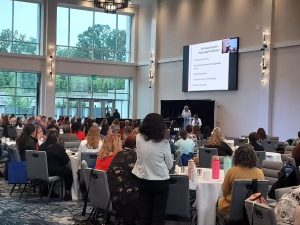
Kara and Alice Brouhard give Keynote Address on Day 2

Our two-day Assistive Technology conference, held on June 9th and 10th at the Bristol Event Center, was a great success with an overwhelmingly positive response! We had almost 250 attendees daily and a wide array of 30 exhibitor tables and 15 dynamic breakout sessions each day.
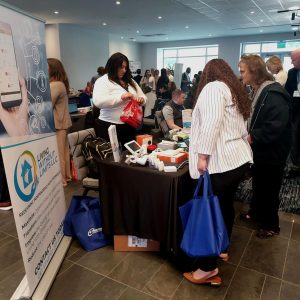
2025 Tech Tools for Life Conference Exhibit hall with attendees visiting the Living without Limits table.

Our keynote speakers, Lynne Seagle on Day 1 and Kara and Alice Brouhard on Day 2 delivered moving insights that left attendees inspired and invigorated.


The Survey Says…
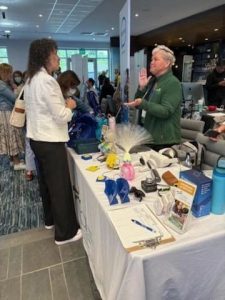
Visiting with UCP of Eastern CT’s exhibitor table.

Our Conference post-survey revealed a clear theme: attendees want more dedicated time for hands-on engagement with the AT devices and more interactive sessions.

About the Sessions:

“All sessions I attended were great! At times wish I could have been in 2 rooms at once.

Kudos for Keynotes:

“The keynote speaker was absolutely amazing!”

“Kara shared her story and a great real-life example of AT in practice.”

From an Exhibitor:

“My overall experience was top-notch.”

Favorite Sessions:

“I loved them all. Can’t possibly choose just one.”

You spoke – we listened!

As a result of the feedback we received, we have been working hard to establish the 2026 Tech Tools for Life, Assistive Tech at its Best: Hands-On Series.

Rather than a full two-day conference in 2026, we are planning a series of hands-on sessions across the state. You can tailor your AT learning experience by choosing sessions that interest you most and will give you the opportunity to engage directly with the latest in Assistive Technology. Dive into topics like Cooking with AT, DIY/Make & Take, Smart Home innovations, Accessible Gaming, Wearable Tech, Cutting-Edge Artificial Intelligence, and more. The Hands-on Series will begin in February 2026 and will run to the end of next year.

More information and details will be hitting your inbox soon. In the meantime, you can visit www.TechToolsforLife.org to find updates on the calendar for the Hands on Series for 2026, including location, registration links, payment information and more.
Tech Tools for Life Assistive Tech at its Best Hands On Series 2026 logo

For a Taste of What’s to Come

The Hands-On Series will kick off on February 12, 2026, from 10am – 2pm with our first session: Hands on… Aprons On: Cooking Without Limits presented by Living without LimitsThis session will accommodate up to 50 attendees who will be cooking with the use of Assistive Technology devices and will be able to enjoy the food as they make it. A modest registration fee of $25 per person will be charged. More info to come soon!


Nigel and James from Living without Limits are Cooking with AT.
Categories
Announcement News and Events Smart Home Tech

First-of-its-Kind Smart House Showroom & Assessment Center Opens

By Pam Fields, CEO of ARC and Living Without Limits

Connecticut has launched a groundbreaking new resource for assistive technology: the Living Without Limits Smart House Showroom and Assessment Center in Meriden. Opening its doors in October 2025, this fully functioning house represents the first facility of its kind in the state, offering a hands-on environment where individuals can explore, test, and experience assistive technologies before making purchasing decisions.

Pam Fields addressing attendees at the Ribbon Cutting Ceremony

Operated by Living Without Limits at MidState Arc, Inc in collaboration with the CT Tech Act Project, the Department of Aging and Disabilities, and the Department of Developmental Services, the Center serves all populations including individuals with intellectual and developmental disabilities, traumatic brain injury, aging-related needs, veterans, autism, mental health conditions and anyone with barriers to independent living. The showroom features a comprehensive array of technologies including lift systems, smart showers, smart ovens, stove, and microwave safety devices, cooking aids, remote support systems, employment assistance, and medication management tools. Visitors can tour the center to see these technologies in real-world settings, while assessors from across Connecticut can conduct evaluations in this accessible environment.

A key feature of the center is its extensive lending library, allowing people to borrow devices and try them in their own homes before committing to a purchase. This try-before-you-buy approach removes barriers to accessing appropriate assistive technology and ensures individuals find solutions that truly meet their needs. The center was made possible through funding from the Governor’s Non-Profit Grant Program, the Department of Developmental Services, The CT Tech Act, the City of Meriden, and various grants and foundations. Connecticut residents interested in scheduling a tour or assessment can visit livingwithoutlimits.org and complete a request form. This innovative facility represents a significant step forward in making assistive technology accessible and user-friendly for all Connecticut residents seeking to live more independently!


Categories
AT Success Stories News and Events Product Spotlight

How AI Glasses Gave a CT Photographer His Independence Back


Reprinted from WHSU Public Radio By Jeniece Roman, WSHU, Photos: Jeniece Roman / WSHU

After a long career as a photographer, a Connecticut man had to come to terms with the gradual loss of his eyesight. However, with the help of new technology, he’s reconnecting with the world.

Jack McConnell has been a commercial photographer for over 50 years. McConnell was diagnosed with diabetic retinopathy, an eye disease caused by diabetes that brings gradual vision loss. Now he’s completely blind in one eye and can only see dark shapes and light in the other.

“A year ago, I could see the trees across the way, with their incredible branches and leaves and green dancing to the breeze of a springtime day. Not anymore. It’s black. It’s dark gray. There’s nothing there,” McConnell said.

Before his condition, McConnell traveled the world to meet interesting people and embedded himself in different communities. From traveling on a container ship in the North Sea to taking photographs of locals on an island off the coast of Maine, McConnell has taken roughly 250,000 images throughout his career. He said the shift has been a difficult change in his life.

“When something happens, you either fight it or you deal with it. And I’ve had to learn to deal with it,” McConnell said.

Then, a friend of McConnell recommended he visit UCP of Eastern Connecticut, a nonprofit center that provides programs for people with disabilities. Patients are then matched with programs and services based on various factors. The center has a lending library where people can rent assistive technology to try before purchasing.

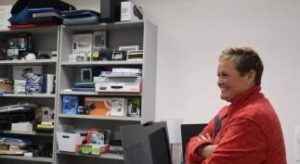
Shannon from UCP of Eastern Connecticut stands in front of the device lending library with a smile.
Shannon Taber with the UCP of Eastern Connecticut.
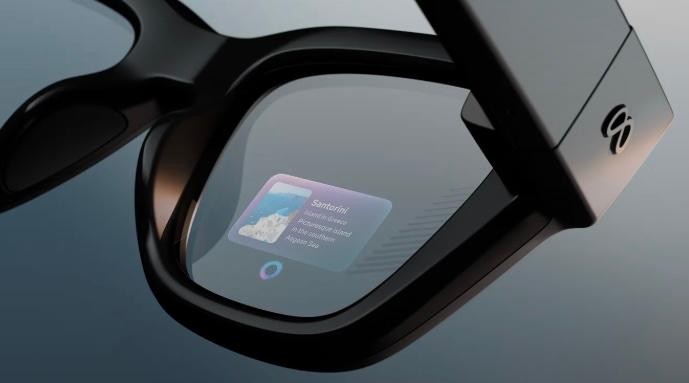
Shannon Taber is the director of Inclusion and Accessibility. Taber trained McConnell on how to use Meta AI glasses, a new technology from Ray-Ban and Meta, makers of Facebook. The glasses combine voice commands with artificial intelligence. Although they look like a normal pair of sunglasses, the Meta glasses have cameras that can take photos, scan the area in front of them, and even speak to them through built-in speakers near the ears. The glasses can identify items like food menus, money and medication labels.

“Jack said, ‘I really like these. Can I keep these for a while?’ And so we did a four-week loan with the Meta glasses. Jack liked them. Found some significant independence with those,” Taber said.

McConnell previously tried ORCam technology, but he preferred the Meta glasses. Compared to the nearly $4,000 price tag, the $400 Meta frames were more affordable. Funding is a huge hurdle for the center. Taber said the center does a lot of grant writing and is always looking for new partnerships. The center purchased the glasses through special funding from the Connecticut Tech Act.

“This is a population that is always underserved and always underfunded. They usually live on a very limited, very tight income, very constrained, and we get requests on a daily basis for assistance,” Taber said. “I would say the greater majority of the time, assistive technology is not within their budget. So for us, we have to find ways. To fund it for them.”

Jack at the farmers market using his Meta glasses.
Jack is at the farmers market using his Meta glasses.

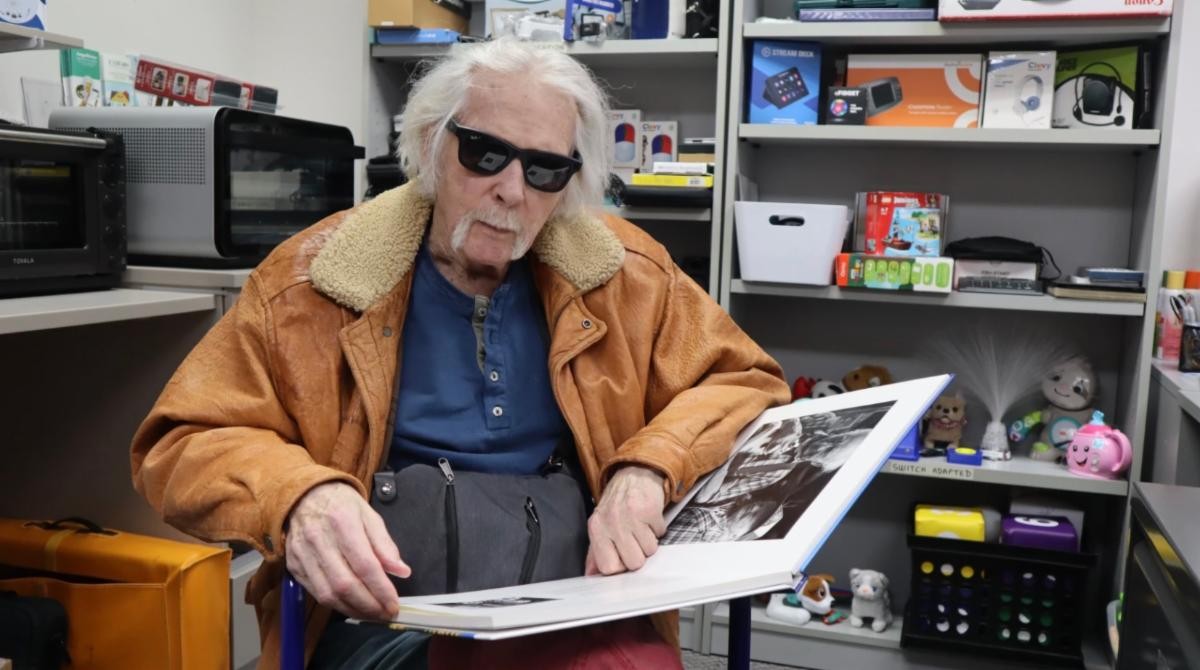
On a visit to the center, McConnell met with Taber to test out a few more features. With the command “Hey, Meta,” McConnell can ask the glasses to take a photo or describe what’s in front of him. McConnell sat down with a book of his photography. He asked the glasses to describe the picture in front of him. From the description, McConnell recognizes the subject of the photo and begins to tell a story about the encounter. Now, he can ‘see’ his photography with the help of the glasses.

McConnell said the glasses have allowed him to get back to daily life, from reading a menu at restaurants to grocery shopping and meeting up for coffee with friends. He said the glasses have significantly opened up his environment and that he looks forward to using them more.

“I now have the glasses, and they do help me see where I am when I go out. I’m really looking forward to going out a lot more and getting out of the house, getting into the world and dealing with it with the help of Meta,” McConnell said. “I know that’s going to make a big difference for me.”

McConnell said with his renewed confidence, he’s less isolated and feels like he’s part of the world again. He may even start taking photos again.


Categories
News and Events Product Spotlight

Tech Tool Spotlight: Meta Glasses – Live AI

Reprinted from the NEAT Newsletter, Dec. 2025 assistivetechnology.oakhillct.org

Here’s how it works:

To start a session, say “Hey, Meta, start Live AI.”

Once the session begins, you don’t need to say “Hey Meta” again during that session. To Pause, say “Pause Live AI” or tap the touchpad. To resume, say “Hey Meta, resume Live AI” of tap the touchpad again. To stop a session, say “Stop Live AI” or tap and hold the touchpad.

Blindness / Low Vision

  • A student with low vision entering a cafeteria can ask the glasses, “What does this menu say?” and hear the options.
  • While walking across campus, the glasses can alert the user to stairs, doors, or uneven surfaces.

Hearing

  • During a lecture, the glasses can display live captions so the user can follow along without a sign language interpreter.
  • The glasses can flash a light on the lens when a fire alarm goes off.

Mobility

  • In a large office or hospital, the glasses can guide the user to the exact room without relying on a phone or map.

Cognitive or Learning

A person with memory challenges cooking a meal can receive real-time instructions, such as “Next, chop the onions.”

Categories
Announcement News and Events Uncategorized

Register Now for CT’s AT Conference ! May 6 & 7, 2024

Tech Tools for Life Assistive Tech at its Best!

When: May 6th & 7th, 2024

Where: Omni Hotel, New Haven, CT.

Meet, network, learn & share with people advancing independent living through technology.

Register now at the Early Bird rate at this link: https://atechconference.org  and come back often to stay informed on:

  • Conference sessions
  • Speaker Announcements
  • Exhibitors, and
  • Sponsors

ATECH Conference 2024 is sponsored by the CT Tech Act Project & the Connecticut Council on Developmental Disabilities.

Categories
Announcement News and Events

ATIA 2024 – A Fantastic Learning Experience!

Written by Nicole Deary, AT Specialist, EASTCONN

My colleague and I recently attended the Assistive Technology Industry Association (ATIA) conference in Florida, and we are thrilled to share our experience. The event was a treasure trove of information, providing valuable insights into the latest advancements in technology designed to support individuals with communication disorders and other disabilities. The conference showcased a diverse range of products and solutions that left us impressed and excited about the possibilities in our field.

One of the highlights was attending the comprehensive sessions that delved into the practical applications of various assistive technologies. These sessions covered everything from augmentative and alternative communication (AAC) devices to innovative apps and software designed to enhance communication skills. The presenters were experts in their respective fields, offering in-depth knowledge and practical tips that we can now integrate into our practice.

The exhibit hall was a bustling hub of activity, with numerous vendors showcasing their latest products. It was a delight to explore the myriad of options available, each catering to different needs and preferences. From cutting-edge AAC devices with customizable features to user-friendly apps that promote language development, the diversity of assistive technology was truly impressive.

Engaging with the vendors provided us with a hands-on experience, allowing us to better understand each product’s functionality and potential benefits. Additionally, networking with professionals from various disciplines, as well as from our own home state of Connecticut, opened up opportunities for collaboration and knowledge exchange. The vendor exhibit was not only a feast for our mind but also for the taste buds, as attendees were treated to delicious hot pretzels and refreshing ice cream, creating a delightful atmosphere for networking and informal conversations.

Overall, the conference was a fantastic learning experience, and we left feeling invigorated and inspired by the vast potential of assistive technology. The event not only deepened our understanding of the available tools but also reinforced the importance of staying abreast of technological advancements to better serve individuals with communication disorders. We are eager to incorporate our newfound knowledge into our practice and contribute to the continued advancement of assistive technology in our field.

Categories
Announcement News and Events

Bridging the Digital Divide: A Success Story

Written by Miriam Johnson, Inclusion & Accessibility Manager, ATS, United Cerebral Palsy of Eastern CT

Milton suffered a stroke that permanently affected his mobility. He was forced to sell his mobile home and move into an affordable apartment that provided accessibility, but was no longer near his friends and family, leaving him completely alone and isolated. He had not spoken to his brother or sister in over 6 years, and he missed seeing and talking to them.

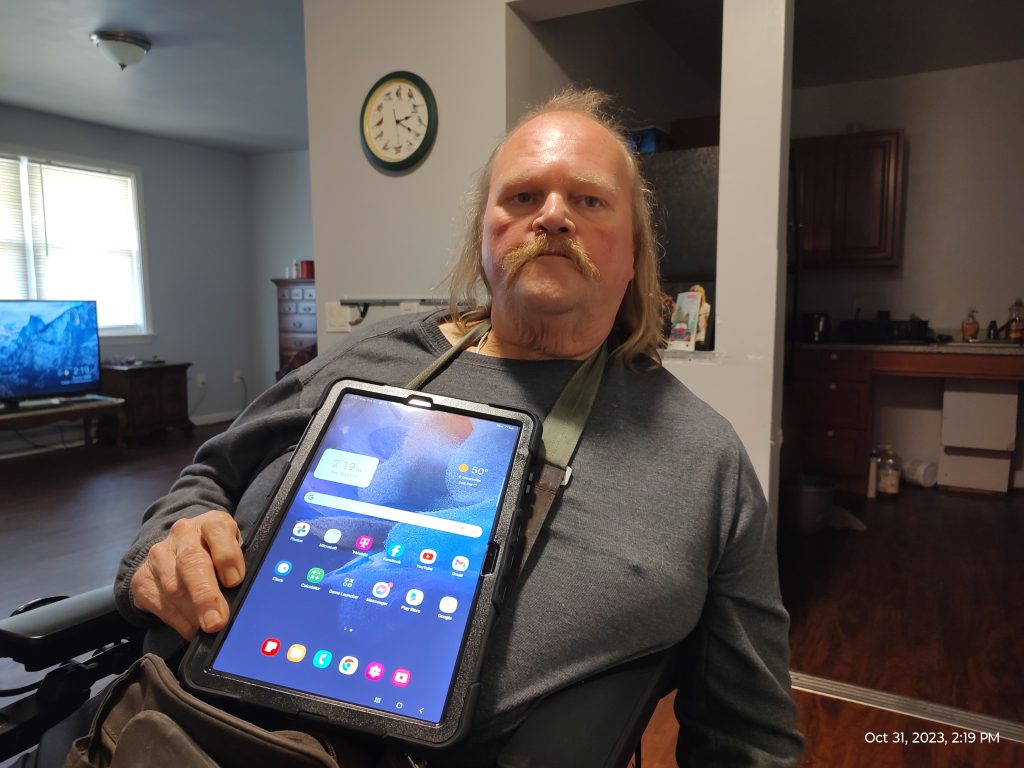
Milton with his new iPad

After setting up the new tablet for Milton, we were able to add his email address and create a brand new Facebook account for him. We took his photo, uploaded it as his main image, and helped him create 

his online profile to make it possible for friends and family to look him up online. We helped him locate his brother and sister, helped to connect them as friends, and then trained Milton how to message them. We then trained him how to use Facebook Messenger and he and his sister and brother held video calls together for the first time in over 6 years. He was thrilled to catch up with them!

Since Milton only has use of one arm and hand, we set up Google Assistant to give Milton the ability to use voice commands to operate most of the tablet’s functions. We also attached a shoulder strap to the device and set it up uniquely to hang around his neck and balance on his abdomen to make one-handed usage possible.

Categories
General News and Events

Don’t Ditch the Smartphone: A Care Giver’s Guide to their Loved One’s Phone

Written by By Jerilyn Fleck M.S Ed, Special Education

As your loved one is aging, they can still use their smartphone for multiple things besides phone calls and text messaging. In this article, I’m going to focus on two essential tasks to enhance cognitive engagement and mental sharpness: staying connected and playing thinking games. I’ve used some of these tools in my experiences as a caregiver and I’ve learned of others in my graduate work in assistive technology at Southern Connecticut State University. 

Staying Connected

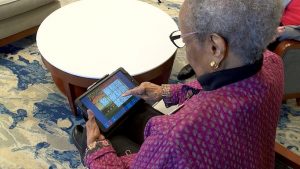
  1. Stay connected to loved ones through Skype, Facetime, Google Meets, or Zoom.Older adult using the Birdsong touch screen tablet This is a great way to visually connect with loved ones near and far. Setting up weekly family meetings helps maintain a sense of normalcy and belonging. Should your loved one has memory difficulties, it also helps reinforce and identify family members. For those that have difficulty hearing or understanding what is being spoken, closed captions can be enabled on most platforms. 
  2. Virtual visits – With the use of technology your loved ones can go anywhere in the world, explore museums, and national parks just to name a few. For example, Google Arts & Culture https://artsandculture.google.com/explore, lets you explore different art collections from a variety of artists, time periods, and mediums. The Taste of Home https://www.tasteofhome.com/article/free-virtual-tours/ website gives a short list of museums around the world and zoos in the United States that can be visited virtually. While visiting the virtual museums, you can take the opportunity to demonstrate how to navigate the site’s features (zoom, left-right keys, and maps). If they are an animal lover, many zoos have real-time cameras where you can watch particular animals. Air Pano https://www.airpano.com/ allows the viewer to have a 360͒ view of different destinations and locations all around the world. From Maui, Hawaii to the Taj Mahal, their virtual vacations are endless. Google Earth https://earth.google.com will allow your loved one to visit their childhood home, honeymoon, or other memory spots, simply by entering the specific location’s address. Introducing these possibilities in the virtual world can foster new shared experiences and trigger past memories. 
  3. Digital Picture Frames –  There are many manufacturers that offer digital picture frames. These frames can sometimes hold up to 400 pictures (depending on the manufacturer). For example, Frameo https://frameo.net gives each family member a unique passcode to add pictures. Once the app is downloaded and the passcode is entered, you are able to send pictures instantaneously to the recipient’s frame. Personally, I am able to send pictures of my children’s important moments instantaneously to my 82-year-old mom who has moved to Texas. Additionally, we are able to send other special moments like weddings, baby pictures, and long-distance family members. This picture-sharing avenue is another way to help your loved one stay connected.

Thinking Games

My final tip is to use technology to keep a loved one’s mind sharp. Motivating cognitive engagement is essential for mental sharpness through all stages of life. There are so many different options for them to explore, given their interest and abilities. Most can be easily downloaded to a tablet, laptop, or smartphone.

  1. GeoGuessr https://www.geoguessr.com/  takes you to different places around the world. It also requires the user to navigate and use their knowledge to guess the location displayed on the screen. This tool can reinforce descriptive questioning and language. This site does require you to set up a free account for them. 
  2. Lumosity Brain Training  https://www.lumosity.com. The app is a free subscription (however, it contains ads) or $11.99 (without ads) per month. This app targets memory, reasoning, flexibility, problem-solving, and attention. After you enter basic information, the user takes a “brain fit test”. Once complete, the user is ready to play. For example, one game requires the user to quickly remember the previous shape presented. Other games enhance math and language skills.
  3. When selecting apps for your loved one, options should revolve around their particular interest. There are apps for crossword puzzles, word searches, solitaire, bingo, hidden objects, or just fun matching games like Candy Crush. You name it, I am sure that there is an app.

Final Thoughts

Harnessing the opportunities within technology can enable your loved one to stay connected to family, travel the world, and/or exercise the brain. All of these things continue to support cognitive engagement and mental sharpness. As always, be sure to practice safe technology use when downloading and using some of these free tools. 

Additional links and resources: 

Bridging the Digital Divide for CT – https://cttechact.com/bridging-divide/

Joan Green http://www.innovativespeech.com/

AARP Technology Resources – https://www.aarp.org/home-family/personal-technology/

Aging and Health Technology Watch – https://www.ageinplacetech.com/

Categories
News and Events

Home Safe Home

Written by Shannon Taber

Bin, pictured smiling while sitting in his power wheelchair As the Director of Inclusion and Accessibility at UCP of Eastern CT, I had the pleasure of working with Bin (pictured) and his wife, both of whom are wheelchairs users. They moved into an accessible home in the past year and with the support of staff from the Department of Developmental Services (DDS), they lived fairly independently. I had the chance to work with Bin to provide a comprehensive Assistive Technology evaluation to help identify Assistive Technology devices and Smart Home Technology to increase their independence in their home, particularly for when they didn’t have staff there.

For example, Bin mentioned that he didn’t like going to bed at 8pm when staff were leaving for the evening because staff would lock the door and turn off lights on them. He also mentioned that his wife struggled to open their front door which had a traditional doorknob on it.

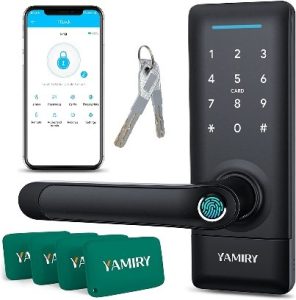
Recommendations were made to provide and install smart plugs and smart lights like the Philips Hue, the Ring Doorbell and Ring solar lights, an Alexa enabled microwave, the Nest thermostats, and Smart Blinds. I also recommended a lever door handle with biometric and keypad lock that also works with an app.

After installing these items and providing training, Bin and his wife were able set the lighting in their home to turn off with scheduled events, such as having the lights turn on one hour before “sunset” and turning off at 10 pm allowing them to stay up when staff left for the evening. This way they didn’t have to leave the lights on all night or sit in the dark at 8 pm at night. We also set their lights to turn on under the bed with motion detection providing safety lighting in case Bin got up in the middle of the night. Lastly, we also connected the smart devices to Alexa so that they could be used with voice commands. Bin was super excited to be able to open and close his blinds with the power of his voice!

Smart level door handle with keypad

Little did we know that within a month of installing these devices, and specifically the door handle, Bin would need to call 911 in the middle of the night for help for his wife. Bin was able to tell his Alexa to unlock the door for the fire department and police, from his bed, so they could get inside and provide the help his wife needed.

Needless to say, the smart home devices provided to Bin and his  wife have not only increased their independence but allows them to stay safe in their home, sweet home!


Categories
News and Events Product Spotlight Smart Home Tech

Holiday Shopping Just Got Smarter!

Written by Amy Norton, EASTCONN & Arlene Lugo, CTTAP

Snow falling on smart home devicesSmart home technology devices make awesome holiday gifts, especially for individuals with disabilities or aging adults who might be looking for ways to enhance access to their home, improve their functioning, and make a real difference in increasing their independence!

Here are some of the more common smart home devices that our Assistive Technology partners have been recommending this past year (in no particular order): 

Smartplugs like the Wemo or Kasa Wi-Fi Smart Plugs

These Wi-Fi outlets can be plugged into your regular wall outlet. Connect it to your home’s Wi-Fi and download the app. Such an easy way to upgrade and automate your regular (not smart) devices. Whatever you plug into the smart outlet can now be controlled by the app or via voice control through an Amazon Alexa or Google Assistant. These devices provide an excellent way to turn lights, devices and even holiday displays on and off, especially if the outlets are hard to reach, outdoors or when you are away from home. 

Philips Hue Motion sensor –

Turns your lights on and off with motion – it’s hands-free and voice-free. Simply walk or roll past the sensor to turn the lights on to increase safety and reduce trips, falls and bangs. These sensors are especially helpful when entering or leaving home, when a light switch is hard to reach, or for those late night trips to the kitchen or bathroom. The Philips Hue Motion sensor works great with the Philips Hue smart light bulbs. It is battery-operated, which means that someone will need to change them periodically, and it connects to an app for initial setup. 

Video doorbells –

Allow you to see who is at your door right from the app. Is it a delivery person dropping off a package, your personal care attendant, family, friends or neighbors stopping by to celebrate the season or someone you don’t know? Not only can you see the person, you can speak to them through the doorbell. Some alert you via motion before they even ring the doorbell. CNET offers a great article comparing some of the top video doorbells, including prices and features. 

Smart Assistants – 

Amazon Echo Show Series brings all the smarts of Amazon’s voice assistant, along with the ability to video chat and watch cooking or other videos and look up recipes to make your favorite holiday meal. Use “drop-in” to allow family, friends and caregivers to stop in virtually using both audio and video.

This feature of the Echo Show devices does not require you to answer and can provide added safety for those times when you are alone especially if you are at risk for falls, need reminders to take medications or are unable to visit with others in person. During set-up, you control who is able to drop-in. The devices in the series come in 5, 8, 10 and 15 inches. Read the CNET Echo Show 5 Review.

Google Nest Hub – according to CNET, the second-gen Google Nest Hub is “a super smart device that brings convenience to nearly every dimension of the Google Assistant-powered smart home. Whether you’re streaming music, checking who’s ringing your video doorbell or playing YouTube videos, the Nest Hub’s got you covered.”

The display on the device is 7 inches but if you are looking for a larger display, check out the Google Nest Hub Max which is 10 inches. Read the CNET Google Nest Hub Review.

Happy Holidays to All!